Local rank tracker: your Google Maps rank changes block by block
You might rank #1 outside your front door and vanish three streets over — where your customers actually search. This local rank checker scans your whole service area at 49 separate points and shows you exactly where you win and where you're invisible.
“Google says I'm #1” — but your customers can't find you
The rank you see when you search your own name isn't the rank a customer sees a mile away. Google's local results shift with location. A single-point rank check hides your dead zones — the neighborhoods where a competitor owns the map pack and you're nowhere. The heatmap makes those zones impossible to miss.
How the heatmap works
49 virtual search points
We lay a 7×7 grid over your service area — up to ~7 miles wide for a local business — anchored on your Google Business Profile location.
Real Google local results
At every point we run your keyword through Google's live local results, exactly as a customer standing there would see them — and record your rank position.
Your win/lose map
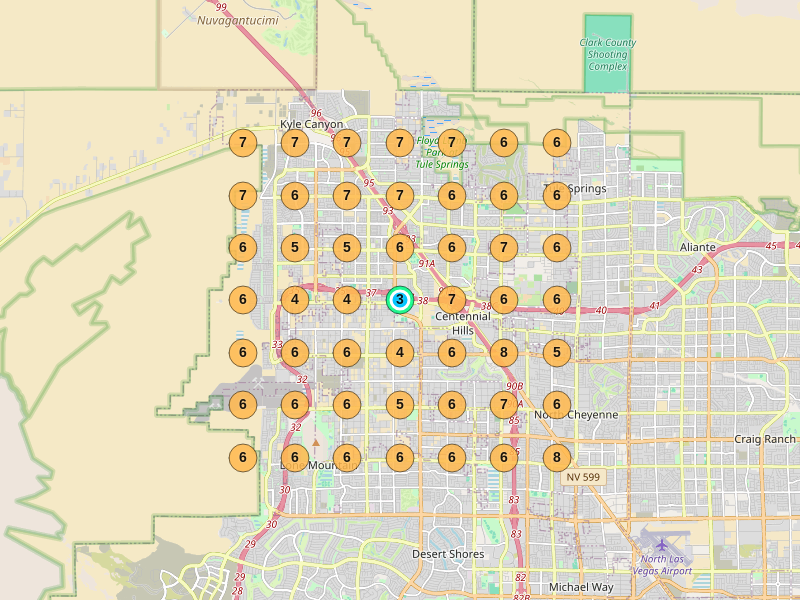
Each point colors green (top 3), amber (4–10), or red (invisible). In one glance you see where you own the map — and where a rival does.
A real heatmap, block by block
For illustration only. An actual local-ranking heatmap for a business across its Las Vegas service area — green where it ranks, red where it's invisible. Your own grid will look nothing like it.
The heatmap is one of ten tools — you get all of them
Come for the ranking heatmap. Your subscription also turns on a daily brief on every competitor's moves — automatically, every morning. No extra cost.
Not ready for a card? Run the free demo, then get 4 free weekly briefs on your own business — just your email.
Find your dead zones this week
See exactly where you're winning the map — and where a competitor is quietly taking your customers.
See your heatmap — start a plan →